
By Kari Williams with support from former IPUMS research staff member Danika Brockman
We love to extend useful functionality across multiple IPUMS data collections, so we were delighted to extend the the Adjust Monetary Values (AMV) feature, which adjusts dollar values for inflation and was first developed for IPUMS USA, to IPUMS CPS. The initial release of the AMV feature in IPUMS CPS in 2023 provided adjustment for a limited number of variables. Late last year, we extended the feature to cover variables from the ASEC as well. This blog post provides a quick introduction to the AMV tool and step-by-step guidance for using the tool in IPUMS CPS – for full details on the feature, see our IPUMS working paper on the AMV feature.
The Basics
The AMV feature allows users to adjust the monetary variables in a customized dataset from IPUMS into constant dollars, so that all monetary variables for months and years of data in your downloaded data file are in comparable units. IPUMS CPS variables are adjusted to 2010 dollars using the Consumer Price Index for All Urban Consumers (CPI-U). When you add an inflation-adjusted version of a variable to your data extract, the IPUMS data access system applies the appropriate CPI-U adjustment factor for each year to the variable(s) you’ve selected and includes both the original variable and an inflation-adjusted version of that variable in your extract. The adjustment factor is only applied to codes that represent monetary values in the original variable. All missing data codes (e.g., NIU, “Refused”, “Don’t Know”, and “No response”) from the original variable are combined into a single NIU code consisting entirely of 9s in the adjusted version of the variable (which is two digits wider than the original variable).
Note that IPUMS only adjusts monetary variables for years with a final published CPI-U. Final CPI-U values for a given year are typically published early in the next year (e.g., the 2025 CPI-U values are published in 2026). Notably for basic monthly CPS data, current year samples will not be available for adjustment because the final CPI-U will not be published. However, the reference period for the ASEC is the previous calendar year (e.g., 2024 is the reference year for the 2025 ASEC); the adjustment factor for the reference year has been published by the time Census Bureau releases the ASEC data each September and we integrate them into IPUMS CPS. One quick way to check whether the CPI-U value has been published for a given year is to consult the IPUMS CPS CPI99 documentation. We also update the IPUMS CPS revision history to note when we have extended the AMV tool to cover an additional year of data. Any adjusted variables in your extract for samples that are not yet available for monetary adjustment will consist entirely of the adjusted variable NIU code (i.e., a string of 9s).
Using the Adjust Monetary Values
The IPUMS AMV tool works seamlessly with the rest of the IPUMS data extract system.
Step 1: Create your data extract as usual
Add all the desired variables and samples to your cart, including monetary variables. Navigate to your data cart and click “Create Data Extract.”
Step 2: Select the “Adjust Monetary Values” option
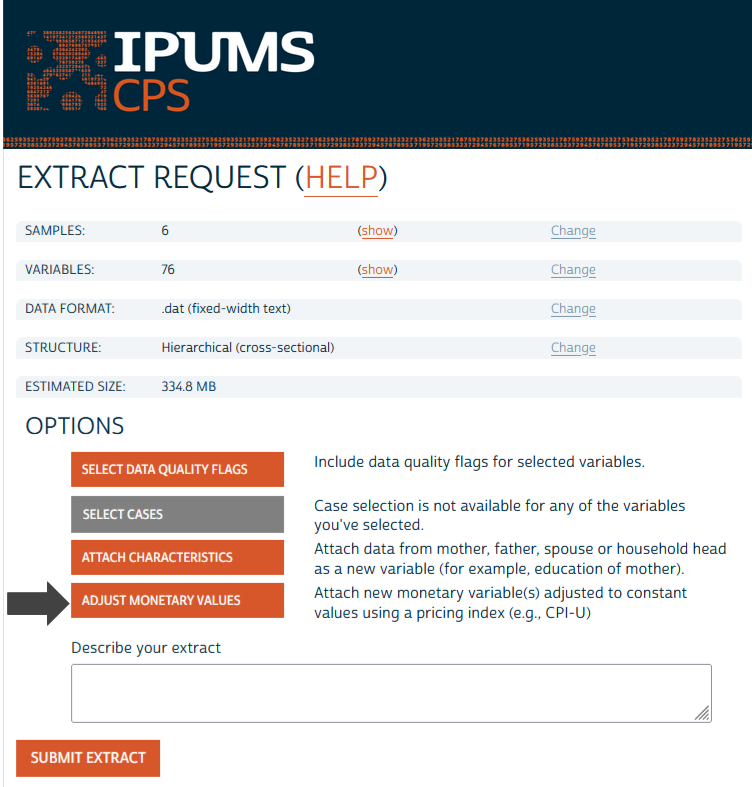
The “Adjust Monetary Values” option is listed as one of the Options on the Extract Request page. If the button is grayed out, that means that you haven’t selected any variables or samples that are currently available for adjustment (see the list available variables on the IPUMS CPS AMV Feature Page). You will need to include at least one variable and sample that are available for monetary adjustment to your cart before the feature will become available to use.
Step 3: Select all the variables you want to adjust
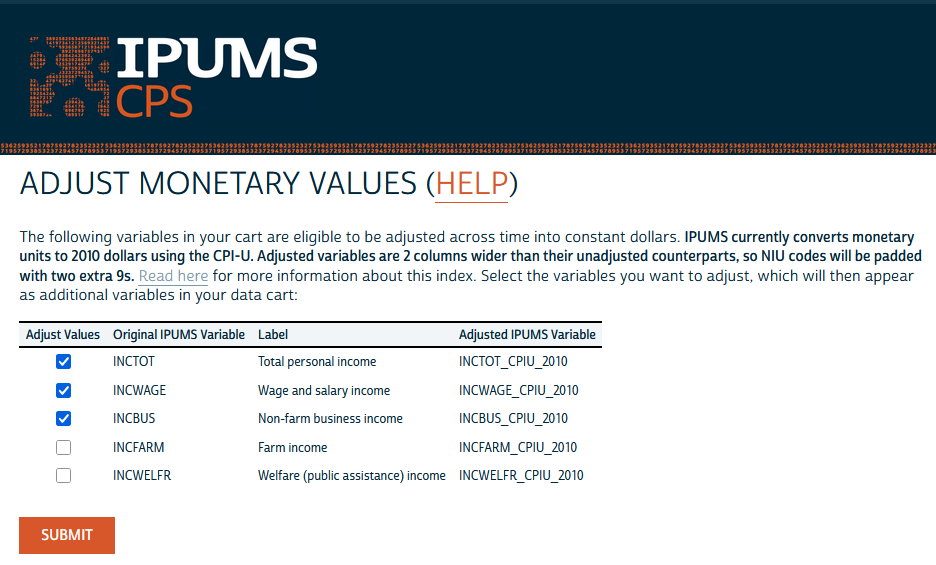
Click on all variables you want to adjust in your extract, then click “Submit.”
Step 4: Submit your extract
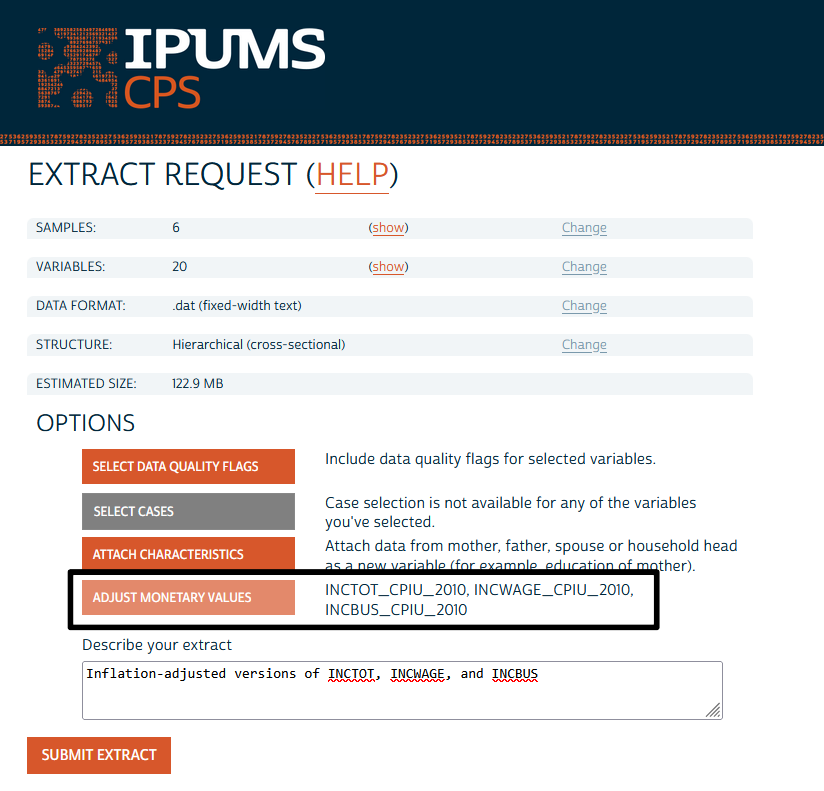
All variables you selected to be adjusted will be included in your extract in both their original form and in their inflation-adjusted form. The adjusted versions will have the suffix “CPIU_2010” added to their names. For example, if you choose to adjust the variable INCOTHER, your extract will include variables INCOTHER and INCOTHER_CPIU_2010. Monetarily adjusted variables will be listed next to the “Adjust Monetary Values” feature button once they’ve been added to the data cart. You can also click “show” next to the “VARIABLES” row near the top of the page, which will display both the original and the adjusted variable in the list.
Step 5: Download and analyze your inflation-adjusted data
Go forth and do your awesome data work with one less tedious task in the way!
What’s next?
Future expansion of this feature may include additional pricing indices, allowing users to specify the target year for their adjustment, and making more monetary variables available for adjustment. Are you wishing this feature was available in another IPUMS data collection? Email ipums@umn.edu to let us know!