
By Anna Bolgrien
IPUMS MICS offers hundreds of harmonized variables related to children’s health and wellbeing that allow for rich and innovative research. From the IPUMS MICS website, users can browse variables and create custom data extracts within a selected unit of analysis. In order to conduct many analyses, however, users will want to combine and link datasets relating to different units of analysis available in MICS.
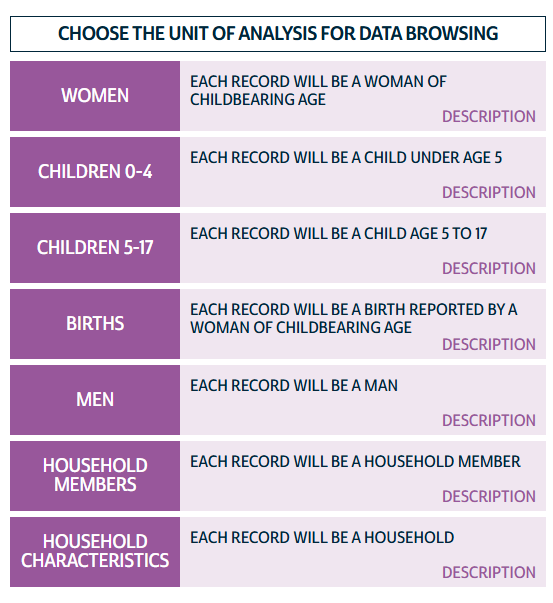
For example, to investigate how child characteristics are related to characteristics of their mother, users will need to download and link data between the Children (either 0-4 or 5-17) unit of analysis and the Women unit of analysis.
IPUMS MICS provides instructions for linking across units of analysis as a user note. This user note lists the variables available as linking keys for each unit of analysis, and is a general guide for linking across the units, such as linking household characteristics with individual person records.
In this blog post, we provide more detailed information on how to link children and adolescents to their mothers. Similar logic can be applied to link children to fathers or other caregivers in the household. As IPUMS MICS requires Stata to conduct harmonization, we provide example code in Stata syntax.
Linking children directly to women or primary caregivers
The “children age 0-4” (known as “CH” unit of analysis) and “children age 5-17” (“FS”, for “five-to-seventeen-year-olds”) units both include a variable called LINEMC for each individual child, which refers to the line number of the child’s mother or caregiver (line number refers to the individual’s unique number on the household roster and is consistent across all units of analysis the individual is included in).
Meanwhile, the “women” unit of analysis includes a LINEWM variable, indicating the line number of the woman aged 15-49 within her household. Therefore, one way to link children to their mother/caregivers is by simply using the LINEMC and LINEWM variables to merge data between the women and the child data files. This will produce a successful link if the mother/caregiver is a women, age 15-49, living in the household, and completed the women’s interview.
To do this, a user would create two data extracts from mics.ipums.org:
- One child dataset, constructed from either the “Children age 0-4” or the “Children age 5-17” unit including the variable LINEMC.
- One woman dataset (WM), constructed from the “Women” unit with the variable LINEWM.1
Important: This does not mean each child will be linked to their biological mother. If a child’s biological mother is deceased or lives outside of the household, a child may be in the care of another person in the household (a caregiver). If the caregiver is woman and age 15-49, this is the individual the child will be linked to in the WM file. The example below illustrates this further.
Example Stata code:
*Start with the children data fileuse ch.dta
*Rename line number variable to facilitate matching between the mother/caregiver and the woman. Linemc represents the line number of the child's mother/caregiver. Linewm represents the line number of the woman. rename linemc linewm
*Multiple children (m) can have a link to only one woman (1) merge m:1 sample cluster hhno linewm using "wm.dta"
The above command represents the children dataset as the “master” and the woman dataset as “using”.
In the example of children age 0-4 in Sierra Leone 2017, the output from the merge command results in the following table (table stylized from the Stata output view).
| Results | # of obs. | Generated variable |
|---|---|---|
| Not matching | 10,820 | - |
| From master | 1,088 | (_merge==1) |
| From using | 9,732 | (_merge==2) |
| Matching | 10,686 | (_merge==3) |
Of the children not matched:
From master: 1,088 children were not matched with a woman. These could be 1) children whose mother was outside of the 15-49 age range or 2) children whose primary caregiver is not a woman aged 15-49 (may be a father, grandfather, or a grandmother older than 49).
From using: 9,732 women were not linked to any children in Sierra Leone. This includes women without any births, women who do not have surviving children, or who don’t have children living in the household.
Of the 10,686 children who matched with a woman, we do not know for certain if the matched woman is the child’s biological mother or a female caregiver such as a foster mother, stepmother, sister, aunt, or grandmother.
In many research questions, it may not be necessary meaningful to distinguish between the children linked to a biological mother rather than another female caregiver. However, there are many research questions that require knowing a child’s biological mother’s characteristics or knowing whether a child’s biological parent is their primary caregiver. The section below details how to determine whether a child’s caregiver is their biological mother in IPUMS MICS data.
Linking children to their biological mother using the household roster
For applications that require linking between children and their biological mothers with IPUMS MICS data, a third dataset is required: the household members (HL) file, which can be used to identify the biological parents of each child using the variables LINENOMOM. In addition to the child and the woman file specified above, users will need a third data extract:
- “Household members” (HL) with the variables LINENO and LINENOMOM
For each household member aged 0-17 in the household member unit of analysis (known as HL – “household list” – datasets), there are variables that indicate:
- If their mother is still alive (MOTHERALIVE)
- If the mother is living in the household (MOTHERHH)
- The mother’s line number on the household list (LINENOMOM).
All IPUMS MICS data extracts that use the household member unit of analysis will automatically include the variable LINENOMOM.
Worked Example in Stata
This example will demonstrate the different linkages by showing a single example household across the household members (HL), Children age 5-17 (FS) and Women (WM) units of analysis.
Household members (hl.dta)
Table 1 shows a household that includes a male head of household (age 45), his female spouse (age 40), and two daughters (ages 16 and 10). We see that the spouse in the household is the biological mother of the daughters as both daughters’ LINENOMOM points to the person with the household line number (LINENO) 2.
Table 1: Example MICS Household
| Unit of analysis | Household line number (LINENO) | Relationship (RELATE) | Sex of HH member (SEX) | Age of HH member (AGE) | Biological mother (LINENOMOM) |
|---|---|---|---|---|---|
| HL | 1 | Head | Male | 45 | - |
| HL | 2 | Spouse | Female | 40 | - |
| HL | 3 | Daughter | Female | 16 | 2 |
| HL | 4 | Daughter | Female | 10 | 2 |
Children age 5-17 (fs.dta)
The FS collects data about one randomly selected child aged 5-17. Both daughters (age 16 and age 10) are eligible, but the daughter on line 4 (age 10) is selected for the FS dataset (see Table 2). The variable LINECH refers to the child’s line number in the household member file. In this example, LINECH = 4 and refers to the LINENO= 4 in the above household member (HL) dataset.
This table also shows that the mother/caregiver for this 10-year-old girl is the person on line 2 of the household (LINEMC = 2). While this is the same person identified as the child’s biological mother (LINENOMOM = 2 in the HL dataset), this is not always true for all children.
Table 2: Example FS Child Record
| Unit of analysis | Line number of child in HL (LINECH) | Line number of mother/caregiver in HL (LINEMC) | Sex of child (SEXFS) | Age of child (AGEFS) |
|---|---|---|---|---|
| FS | 4 | 2 | F | 10 |
Women (wm.dta)
The women interview collects data from all women in the household between the ages of 15 and 49. Both the older daughter (age 16) and the spouse (age 40) are eligible for the women interview (see Table 3). The variable LINEWM refers to the line number of the women in the household member file.
Table 3: Example WM Records
| Unit of analysis | Line number of woman in HL (LINEWM) | Age of woman (AGEWM) |
|---|---|---|
| WM | 2 | 40 |
| WM | 3 | 16 |
Note: This blog demonstrates one method for linking these records, but there are various ways to organize the syntax.
Step 1. Merging child’s information from the household member file to the child’s FS record.
Starting with the FS dataset as the base, merge information about the FS child onto their record from the HL dataset, using the LINENOCH and LINENO variables. This creates a dataset of FS child records that include the LINENOMOM variable for that child, allowing users to identify the line number of the biological mother (LINENOMOM) for each FS child.
Stata Code
*Step 1: Merge the HL information to the FS datasetuse fs.dta*rename the FS identifier to use the name of the variable used to identify that child in the HL datarename linenoch lineno*each fs(1) will merge with 1 housheold member on the hl data. Use the sample, cluster, hhno to uniquely identify the household. merge 1:1 sample cluster hhno lineno using hl.dta*Save the filesave fs_with_hl.dta, replace
Table 4: FS Child Record with Attached Information from Household Member File
| FS Child | Household Member | |||
|---|---|---|---|---|
| Unit of analysis | Child line number (LINECH > LINENO) | HL line no. (LINENO) | Sex / Age of HH member | Biological mother (LINENOMOM) |
| FS | 4 | 4 | F 10 | 2 |
Step 2. Merging women (WM) data using the biological mother line number (LINENOMOM)
After the line number for the child’s biological mother (LINENOMOM) has been added from the household member file to the FS child, then information about the mother can be added from the WM dataset. The WM dataset has a variable called LINEWM that reports the woman’s line number in the household roster (HL). This can be used as a linking key to the FS child record’s LINENOMOM value.
Stata Code
*Step 2: Merge WM information to the FS+HL dataset *using the dataset created in the previous step (fs_with_hl.dta)if not already loaded.use fs_with_hl.dat
*Create a linking key that identifies the WM as the biological mother
rename linenomom linewm*merge each fs(1) to a single wm(1)within a unique sample, cluster, and household (hhno)merge 1:1 sample cluster hhno linewm using wm.dta
Table 5: FS Child Record with Attached Information from Household Member File and Women File
| FS Child | Household Member | Women | ||
|---|---|---|---|---|
| Unit of analysis | Line number of child in HH (LINECH) | Biological mother (LINENOMOM > LINEWM) | Unit of analysis | Line number of woman in HH (LINEWM) |
| FS | 4 | 2 | WM | 2 |
Table 5 shows how the resulting linked file can include data from HL and WM file on an FS child record. The line number of the FS child still points to LINECH = 4 which refers to the LINENO=4 person on the HL file (i.e., the 10 year old daughter).
The line number for the biological mother (LINENOMOM) and the line number for the women (LINEWM) both refer to LINENO= 2 in the household roster (i.e., the 40 year old spouse).
This additional step of adding the HL variables for LINENOMOM onto the record ensures that the person being linked to the FS child is the biological mother of that child. As described in the previous example, in this case the mother/caregiver of this child is also the child’s biological mother, as can be seen by the variable LINEMC= 2 in Table 2.
Linking among other individuals in the household
This blog provides examples of how to link children age 0-4 (CH) and age 5-17 (FS) with their biological mothers. These same concepts can be applied to linking:
- Children age 0-4 or 5-17 to biological fathers in the Men (MN) unit of analysis via the household member (HL) file variable LINENODAD.
- Children to older mothers and fathers or linking children to other members of the household using information from the household member (HL) file.
Upcoming Webinar
For more information, IPUMS MICS is hosting a webinar on linking among unit analysis on April 15 at 10am Central Time. This webinar is free to register and will be recorded. Registration for the webinar is required.
- Note that our data extract system automatically includes LINEMC and LINEWM in each data extract created by the user. Instructions for downloading and creating the harmonized datasets can be found in these extract instructions.